Links dropdown Customization
The Links dropdown of CuteEditor by default displays a predefined set of Links.
You can easily modify this default set using the following methods.
1. Edit Dropdown Configuration file (Common.config).
The dropdown configuration file (Common.config) can be found in the
CuteEditor_Files/Configuration/Shared folder. In dropdown configuration file
you can find the Links element which contains the configuration
information for the Links dropdown within Cute Editor.
You can modify the Links element to create your own Links list.
Example:
- <Links>
- <item text="CuteSoft" value="http://richscripts.com/"></item>
- <item text="Mail to us" value="support@richscripts.com"></item>
- <item text="Yahoo.com" value="http://www.yahoo.com/"></item>
- </Links>
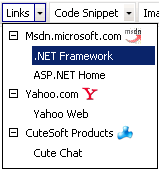
Now the Links dropdown contains the following links.
2. Programmatically populate the Links dropdown
Example:
- <%
- Dim editor
- Set editor = New CuteEditor
- editor.ID = "Editor1"
- 'Programmatically populate the Links dropdown.
- editor.LinksDropDownMenuNames = "CuteSoft,Mail to us,Yahoo.com"
- editor.LinksDropDownMenuList = "http://richscripts.com/,mailto:support@richscripts.com,http://www.yahoo.com/"
- editor.Text = "Hello World"
- editor.Draw()
- %>